 BodyLog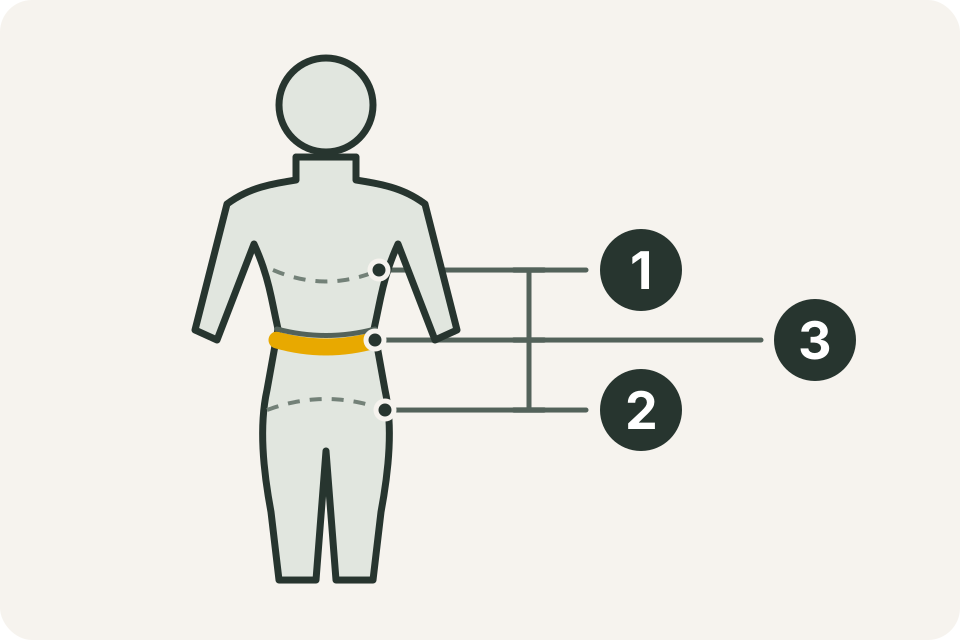
Choose a few body areas, write down how you will measure each one, and use that method again next time. A personal log needs a repeatable procedure as well as a number.
The waist diagram marks the bottom of the ribs (1), the top of the hips (2) and the tape midway between them (3). This follows the self-measurement method in NICE’s waist guidance, Box 1. Breathe out naturally before reading the tape.
Prepare the record before the tape
Have a flexible, non-stretch measuring tape and somewhere to record the result. Use a mirror or another person if you cannot check the tape around your back. Decide whether the log uses centimetres or inches and put the unit in its heading.
For a simple first session, choose only the areas you intend to keep recording. Write down the side for arms and legs. Set up the date and body-area labels before you start so that a value does not end up in the wrong row.
Keep the tape level and comfortable
Measure on bare skin or over a thin layer that you can repeat. Let the tape touch the body without pulling it into the skin. Check the back as well as the front. East Lancashire Hospitals NHS Trust gives these tape-handling instructions and recommends checking a measurement twice.
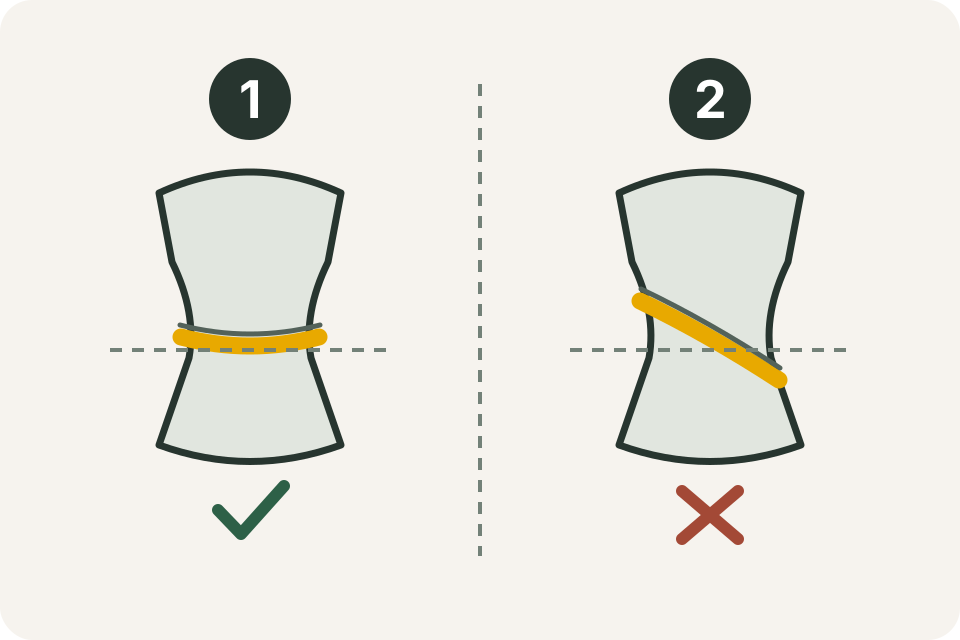
Example 1 keeps the tape parallel to the floor. Example 2 shows a tilted tape. Reposition a tilted or twisted tape before reading it; the diagram is a schematic, not a measurement scale.
Choose and describe the landmarks
| Area | Method to repeat | Note to keep |
|---|---|---|
| Waist | Find the midpoint between the bottom of the ribs and top of the hips; read after a natural breath out. | Write “ribs-to-hips midpoint” so it is not confused with a navel-level record. |
| Hips | Stand with legs together and place the tape around the widest part of the hips/buttocks. | Check that the tape has stayed level at the back. |
| Chest | Pass the tape under the armpits around the fullest part of the chest; do not puff out the chest. | Record the clothing and stance you used. |
| Upper arm | Locate the midpoint between the shoulder and elbow, then measure with the arm hanging relaxed. | Label left and right separately; keep relaxed and flexed records distinct. |
The hip and chest descriptions follow the NHS techniques page. The CDC’s NHANES procedure provides a detailed upper-arm landmark method and shows why a standardized position matters.
For another area, keep a written placement description rather than changing between “widest point” and a midpoint without a note. If a professional has supplied a method for a particular purpose, keep that method as a separate series when it differs from this guide.
Read, check and write it down
- Place the tape at your chosen landmark and settle into the recorded stance.
- Check that the tape lies flat and does not dig in.
- Read the scale at the overlap without changing its tension.
- Remove and reposition the tape for a check reading. If the readings differ, check placement and tension before choosing what to record; do not pick the value you prefer.
- Write the date, body area, side, value, unit and a short method note.
A fictional entry might read: 28 October — left upper arm — 30.2 cm — relaxed arm, midpoint, same tape. The number is only an example of a complete record. Keep blank entries blank when you did not measure an area.
Use one unit for a series
A value of 32 in and 32 cm describes different lengths. NIST’s exact conversion is 1 inch = 2.54 centimetres. Use the centimetres/inches converter when translating an old entry, and keep the original unit in your notes.
The printable measurement chart gives you unit-labelled fields on paper. The spreadsheet tracker keeps metric and imperial logs separate. If you use BodyLog, check the displayed unit before entering a measurement.
Repeat the method next time
Use the frequency guide to plan the next session. If an entry looks surprising, work through the tracking-error checklist before comparing it with older values.
For a visual record alongside the numbers, the progress photo guide explains how to repeat lighting and framing. BodyLog’s Apple Health integration supports weight, height, body fat and waist when you choose to connect that workflow.