 BodyLog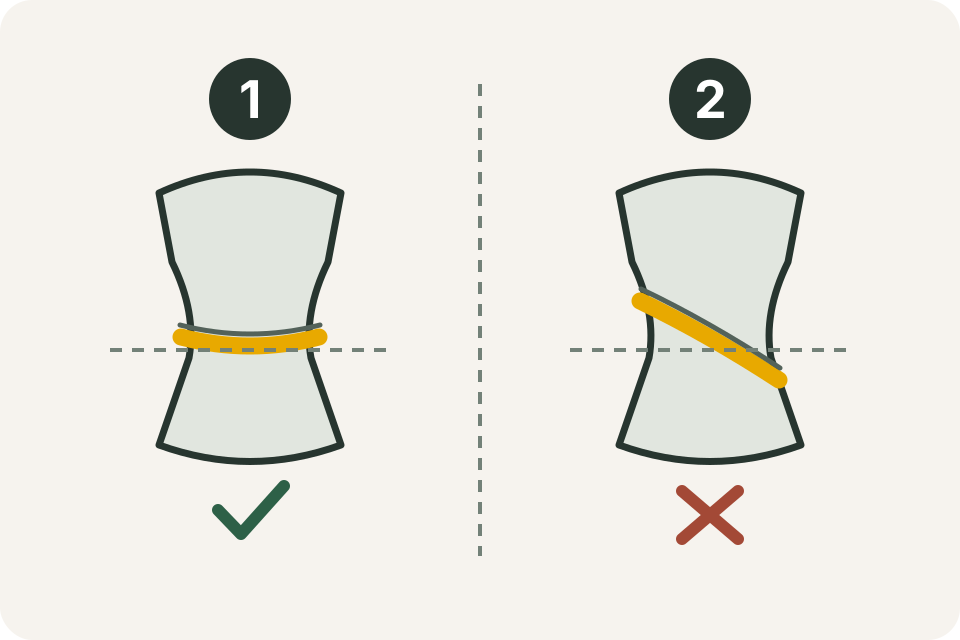
When an entry looks surprising, check how it was made before replacing it. A useful correction leaves enough context to understand both the original record and the reason for the change.
In the diagram, a level tape is marked 1 and a tilted tape is marked 2. Check the back of the tape as well as the front. The NHS tape guidelines call for level placement without pressing the tape into the skin.
Changing the landmark without a note
“Waist” is not a complete method description. A navel-level reading and a reading halfway between the ribs and hips use different landmarks. NICE’s self-measurement method uses the latter midpoint.
Example: an older note says “at navel,” but today’s entry uses the midpoint method. Keep the older label and mark where the new method begins. Do not relabel the past as though both sessions used the same position. The measurement guide illustrates the midpoint landmarks.
Pulling harder to match a previous value
A tape can look level while its tension changes. Reposition it so it touches the body without leaving an indentation. If two check readings disagree, review the setup; do not keep tightening the tape until it reaches a number you hoped to see.
The point of the check reading is to inspect the technique. Record a method change if you cannot reproduce the old one, rather than forcing a numerical match.
Mixing units in one column
Fictional example: the log contains 80 cm on one date and 31.5 in on another. These are close lengths expressed differently, not a drop from 80 to 31.5 in one unit. Using NIST’s exact factor, 31.5 × 2.54 = 80.01 cm.
Keep the original entry and unit when converting. Use the centimetres/inches converter for a check, then enter the result only in a column with the matching label. The printable chart and spreadsheet provide explicit unit headings.
Losing the side or stance
A note that says only “arm” cannot tell you whether it was left or right, relaxed or flexed. The CDC’s upper-arm procedure specifies its landmarks and relaxed position rather than treating these as interchangeable.
Example: rename your future fields “left upper arm — relaxed” and “right upper arm — relaxed.” Keep a separate field if you also want a flexed record. If an older entry’s side is unknown, mark it unknown instead of assigning one from memory.
Turning a missing entry into zero
Zero is a number. It should not stand for a missed session in a circumference log. Leave the value blank and add a note such as “not measured” if needed.
Likewise, do not copy last week’s value into this week’s row just to make a chart continuous. A dated log should show when a reading actually happened. The scheduling guide includes a missed-session example.
Comparing photos with different setups
Check the lens, distance, camera height, clothing and light before pairing two pictures. A different camera setup adds another explanation for a visible difference. Use the photo setup guide to save a reference you can repeat. Compare the same view and label a setup change.
Audit a record in this order
- Confirm the date and body-area label.
- Read the unit printed beside the value or column.
- Check the side, stance and placement note.
- Check for a copied value, missing decimal or misplaced row.
- Correct a known error with a short reason; keep an unexplained difference labelled as such.
A correction note might say “Entered 315 by mistake; tape reading was 31.5 in; corrected the same day.” This is a fictional record-format example. It shows what makes a correction traceable without claiming a real person’s result.