 BodyLog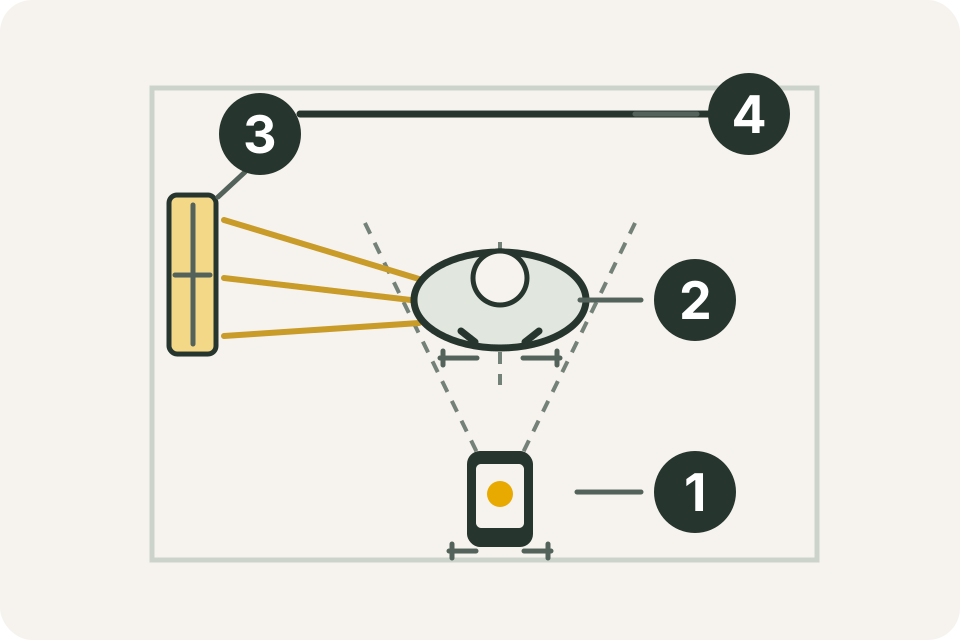
Set up one photo session that you can repeat. Save the setup details with the date so that next time you can match the camera and room, rather than relying on memory.
The diagram shows a fixed phone position (1), a standing mark (2), a consistent light source (3) and a plain background (4). These are suggested home-recording steps; you do not need studio equipment.
Set the phone and standing positions
Put the phone on a stable support. Choose a place where the frame includes the views you want without moving the phone between shots. Mark the phone support and standing position with removable tape if that is suitable for the floor.
Keep the same phone camera, lens selection and distance at later sessions. Canon’s explanation of lens perspective shows how camera/lens choices affect the apparent relationship between subject and background. Matching the setup removes one avoidable difference between pictures.
Record the support height, distance and lens setting as part of your own reference. For example: phone shelf 105 cm high; standing mark 220 cm away; rear camera at 1×; portrait orientation. Those fictional distances describe one setup, not an ideal distance for every camera or room.
Repeat the light and background
Choose a plain background and a light source you can use again. Note which lamps are on and whether a window is involved. Before taking the next session, compare shadows and background brightness with the reference image. If the room or lighting changed, add a note instead of treating the pictures as an exact match.
Use the same camera mode and avoid changing filters between sessions. On iPhone, Apple’s camera-tools guide explains Grid and Level under Settings → Camera, along with exposure and timer controls. These are Apple Camera features; this guide does not assume the same controls exist inside BodyLog’s camera.
Choose views you can reproduce
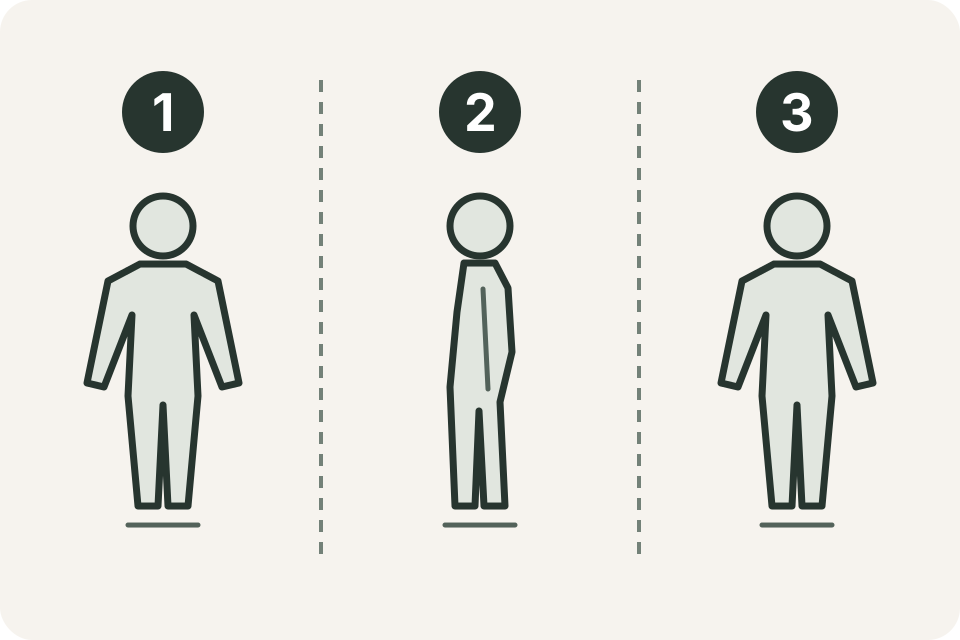
The example sequence is front (1), side (2) and back (3). Use the views that serve your record. Keep your stance, arm position, clothing and framing consistent for each one. For side views, record whether you used the left or right side.
A simple reference note could be: front / left side / back; arms resting; same shorts; feet on floor marks. You can leave your face outside the frame if you prefer; keep that crop consistent too.
Check the pictures before packing away
Review each image while the phone is still in place. Is the full intended area visible? Is the picture sharp enough to see? Does the camera tilt match the reference? Retake a missed or blurred view during the same session and keep the date attached to the final selection.
A short session checklist is easier to repeat than a long set of pose instructions:
- Phone and feet on their reference marks.
- Same lens, orientation and intended framing.
- Same views, side and comfortable stance.
- Light and clothing checked against the reference.
- Date and any setup change recorded.
Organize by date and view
Use a consistent name or note such as 2026-10-28 — front. Keep original pictures available so that an edited crop does not become the only record. When comparing two sessions, start with the same view and check the setup notes before drawing conclusions about the appearance.
BodyLog supports camera capture, photo-library import and side-by-side comparison. The photo feature page explains that workflow. Importing a picture does not make its setup match an older one; the repeatable session remains your part of the process.
For numbers alongside the pictures, use the body measurement guide. The BodyLog overview shows how measurement records and photos fit in the app.